Showing posts with label PayPal. Show all posts

Monday, August 17, 2020

How to get Airtm Virtual Master Card?

Spend online in any currency! Accepted worldwide. Use to make online purchases in any currency. Instant. Get your virtual card through your Airtm account.

Airtm's reloadable virtual card - spend online anywhere.

How to get Airtm Virtual Master Card

Whether you plan to spend abroad with the real exchange rate or manage your money better with dollar savings, Airtm will give you amazing value, speed and technology. Airtm website constantly strive to give you more with Airtm - more for your money, more for your time, which means more out of life.

The Airtm virtual card is:

    Accepted worldwide - Use to make online purchases in any currency, using the real exchange rate, without local restrictions.

    Multiple-use - Create a single-use card, or multiple-use card depending on how you spend.

    Reloadable - Add funds to your card whenever you want (must be verified).

    Simple - No minimum balances or monthly fees.

    Available 24/7 - Our support team is at your service.

How to get a virtual debit card?

    Click on the "Virtual cards" tab in your left side menu.
    Select "Get a card" and follow the steps to purchase.
    Spend online!

How to reload Airtm card?

    Click on the "Virtual cards" tab in your left side menu.
    Click “+” button on card you wish to reload
    Input reload value and click confirm
    Spend online!

For more information visit the Virtual Card FAQ.

When does the card expire?

Multi-use card for verified users:
The card expires six months after it is issued, at the end of the month.

Single-use card for verified uses:
The card expires six years after it is issued, at the end of the month.

Are purchases made on the card refundable?

You will need to have $1USD (for verified users) or $1.25 USD (for unverified users) extra on your card to cover the cost of the transaction fee, otherwise the purchase will be declined.

Note: The per-transaction fee does not apply to the single-use card for verified users.

Multi-use cards for verified users:

Yes, but a $1 refund fee will be deducted from your refund. Even though it’s a single-use card, since your first transaction did not go through, you will still be able to make a subsequent purchase. Your refund will be displayed as "CARD REFUND" on the Activity page. Your balance will be adjusted accordingly.

For single-use cards for verified users:

Yes, if the merchant refunds your purchase, the funds will be sent back to your Airtm account within 2 weeks.


I have money left over on my virtual card. Can I get it back?

Multi-use card for verified users:
To return your card funds to your AirUSD balance. 

Please note:    $2.75 will be taken from your balance to cover the unload fee. It can take up to 3 weeks for the funds to be returned to your AirUSD account. Fees will not be reimbursed.
    You cannot reload a card that has been unloaded.

Single-use card for verified users:
On the Tuesday that is at least 2 weeks after your card was purchased, any remaining balance >$1 USD will be sent back to your Airtm account (regardless of whether you made a purchase, had a decline, or had a refund).


Airtm virtual card Limit and Fees-

 
Start spending now!

Get your Virtual Card

Use your virtual card anywhere online that accepts Mastercard or Visa. Make purchases anywhere in the world. 


You can also read my previous post-

How to Register and Verify Your AirTM Account?


Saturday, August 8, 2020

How To Earn Unlimited Money On ClipClaps App?

ClipClaps is a legitimate app that will pay you to watch videos, upload videos, play games and join different challenges. You'll also earn extra money when you invite your friends and family to join the app. It is easy to collect Clap coins because the videos will keep you entertained for hours on end.

 It's actually a very good app in terms of playing and enjoyment. Also, in terms of earning because there is so many ways to get points and coins. Converting coins to usd is also easy.

How To Earn Money On ClipClaps ?

First Click here to Download and Install ClipClaps App.

Download and Install ClipClaps App.

 Now Click Continue with google.

Click Continue with google.  
Select your Gmail Account.
Select your Gmail Account.  Select Picture and Fill those form and Click Next.
 
Select Picture and Fill those form
 Now Play that Video and Click Rewards.

Play that Video and Click Rewards

Now Click Redeem.


Type this Redeem Code:  8QLKYF5W


Type this Redeem Code:  8QLKYF5W

 Now Click Redeem Rewards.

Click Redeem Rewards.

Now Click Continue.


You will get $1 dollar Signup Bonus.


Play ClipClaps Games to earn More Coins.

Play ClipClaps Games to earn More Coins

Play ClipClaps 5 Lucky Spin.

Play ClipClaps 5 Lucky Spin.
Click More To Exchange Point.
Click More To Exchange Point
You can easily exchange clipcoins to USD.

OR

You can invest your clipcoins to get more Clipcoins.

exchange clipcoins to USD

Invest ClipClaps Points

Invest ClipClaps Points

Invite your Friends and get More Reward box.

Invite your Friends and get More Reward box

Play Clip Claps Mega spin.

Play Clip Claps Mega spin.

 Now Click $1 Reward Raffle.Click $1 Reward Raffle

Play RAFFLE To Earn $1 Reward.

Play RAFFLE To Earn $1 Reward.
 Select your Scratch Card to get your reward.
Scratch Card to get your reward

Collect $1 dollar rewards.

Collect $1 dollar rewards
 Now Click Collect.


Now Watch videos to collect your rewards box.

Watch videos to collect your rewards box

Minimum payout $10 dollars by using PayPal.

Minimum payout $10 dollars by using PayPal

 You can easily withdraw your earning using PayPal.

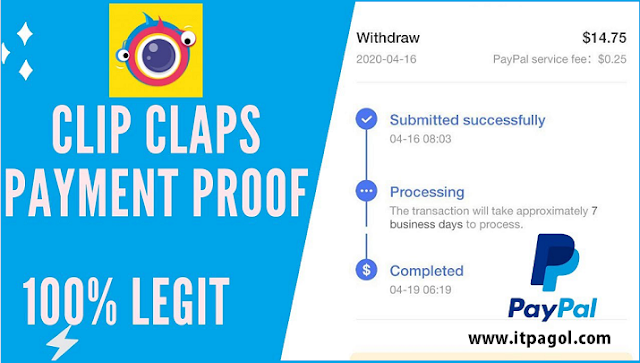
ClipClaps Payment Proof.

ClipClaps Payment Proof. 

Now Play, Watch & Earn using ClipClaps App and Earn Unlimited Money On ClipClaps.

Saturday, September 21, 2019

How To Withdraw BAT Token From Uphold To bKash?

AirTM website is a peer to peer market where people exchange dollars in AirTM for money in other places like- Banks, E-wallets, Gift Cards, Cryptocurrency and many others. One of the common trades in the AirTM Market is the Dollar exchange which happens at the fair market price.

How To Withdraw BAT Token From Uphold To bKash?

Airtm website is an e-wallet connected to over 300 bank and e-money systems via a peer-to-peer network and direct bank connections. Airtm website members Deposit their money as dollars or cryptocurrency, and can send and receive funds domestically and internationally.


Today We Learn :-

  1. How to Transfer BAT Token Uphold to bkash Instantly?
  2. How to Send BAT Token to USD Card?
  3. How to Deposit Uphold to Airtm Account?
  4. How to Withdraw money from Airtm to bKash?

1. Transfer BAT Token From Uphold to Bkash Instantly.

Just Follow Those Steps-

2. How to Send BAT Token to USD Card?

First Login your Uphold Account.

Click Uphold BAT Send To USD Card.

Uphold BAT Send To USD Card

Uphold Confirm Transaction.

Uphold Confirm Transaction


4. Uphold transaction ID.


Exchange BAT token to USD Card Complete.


3. How to Deposit Uphold to Airtm Account? 


Now Login To Airtm Account

Select Deposit Button

Uphold Balance Deposit into Airtm Account.

Uphold Balance Deposit into Airtm Account.

Airtm Deposit Confirm

Select your Airtm E-Transfer Details.

Airtm Peer E-Transfer Details.

This is Uphold member user and Email Address.

Uphold member user and Email Address

Copy That emails address.

Now Go to Your Uphold account.


Click Balance Send To uphold member.

Balance Transfer To uphold member.

Uphold Balance Send to Airtm Peer Email address.


Confirm Transaction to Uphold member email.

Confirm Transaction to Uphold member email.


Uphold Balance Send to Airtm Peer Email address.

  Airtm Deposit Confirm Successful.


How to Withdraw money from Airtm to bKash?

Now Login to Airtm Website.

Airtm Available Balance.

Airtm Available Balance

Now Click Airtm withdraw Button.

How to Withdraw money from Airtm to bKash?

Type your bKash Number and Click Submit Request.

 Click Yes To Confirm bKash Withdraw.

Click Yes To Confirm bKash Withdraw.

Airtm Withdraw Processing.

Airtm Withdraw Processing

Airtm bKash Withdrawal Transaction ID Details.

Airtm Withdrawal transaction Details

Airtm to Bkash Transaction Successfully Completed.

Airtm to Bkash Transaction Completed

You can Dollar Exchange with bKash using Airtm website. 

In this way  Instantly Receive your payment by using paypal, paytm, bkash, bank, Bitcoin and mastercard etc.

Note:-

  • You must have a Verified Uphold Account.
  • You must have a Verified Airtm Account.
  • You must have a bkash Account.
  • You must have a available balance in your Account.
  • You have to rate (feedback) your peer. 

Now you can easily withdraw your Bat Token From Uphold To bKash.

Monday, June 24, 2019

How to Register and Verify Your AirTM Account?

AirTM is your globally accessible dollar wallet connected to +300 forms of value. Airtm site helped you protect your finances problem. You can easily Buy, sell, hold and send your currency. You can also withdraw payments received for freelance work, spend online at a discount. Exchange local currency for cryptocurrency.


How to Register and Verify Your AirTM Account?

Benefits of AirTM Website:-

1. Buy and sell dollars with any currency.
2. Send and receive money locally and abroad.
3. Access payments in e-money networks and gift cards.
4. Easily Buy and sell cryptocurrency.

How to register and verify your AirTM account?

How to register AirTM?


    First click here to SignUp AirTM.


  https://app.airtm.com/ivt/khandakerc63d35b5
 
2. Click on Join button.
It will shown as below.


 Fill Those Form and confirm you are not a robot and click Next.

 3. You will get an email from AirTM.

email from AirTM.

Now check your email inbox/
spam folder and Click Verify.

4. You will be directed to the following page.  
Submit personal infomation

Please provide details correctly same as in the proof of address like-(National id card, driving license, passport) and click Signup.

That’s all registration is complete.


After login, you will see the page like below

Complete your profile.

Place you details and click on Next.


After that, you will see your dashboard like below.

AirTM Dashboard

    Select payment method and select any one of the E-transfer.

supported currency

    For example Paypal you have to provide mail on it. or else you can choose any method if you wish. but it won’t allow you it will be shown like this


How to get
AirTM account verified?
  

To use Paypal or other you have to be a verified member.

    Click on “Verify now”. 


It will take you to the following page.

Provide your information correctly

Provide your information correctly the same as in any proof of document (National id card, Driving license, passport).
 
2. Upload your proof of document. Please be sure it was clarity and your Photo in that document should be identifiable. Otherwise, it would be late to verification.

Upload your proof of document

3. You should upload both sides of the card and Click next.

upload both sides of the card

4. The last one you should take a selfie Holding a document like below and upload.

take a selfie Holding a document

 Just upload selfie holding white paper with written "AirTM", Your AirTM wallet email address and  Today's Date.

That's it. Now wait for account verification.

NOTE:-

1. All image should be clarity otherwise it would be late for verification purpose.

2. Verification time is taken for me 48 hour and for few of my friends completed around 4 days. If it takes too long, than 5 business days file a complaint in the AirTM live chat.

3. For every 3 friends you invite with your referral link and make their first three transactions, you will receive $1.

4. You and your friends must be verified users in Airtm.

5. You and your friends must complete a minimum of 3 deposits or withdrawals.